

Designing a Conversational AI for Clinical Communication Simulation
HealthTech
Conversational UX
AI native product
Shipped

Role
Solo UX Designer: Research, UX Designer, Interaction Design, Prompt Architecture
Duration
4 weeks (March 2026)
Stack
Figma, Claude Code, Lovable
Team
1 Product Designer
Collab w/Medical Board
Here’s a 1 min TL;DR version
THE PROBLEM
74% of medical students get no formal training in breaking bad news
They learn by doing it with a real family. The USMLE Step 2 CS exam, the only national assessment of clinical communication, was discontinued in 2021. No replacement exists.

RESEARCH
Students wanted to learn & practice. They just had no tool built for it.
8 interviews, 12 published studies, 1 ChatGPT prototype test. The same frustrations kept surfacing.
01
Training Gap
Many students receive little or no formal preparation for breaking bad news.
02
Scale Gap
Standardized patients are effective, but expensive, scheduled, and hard to scale across medical schools.
03
Feedback Gap
Students may leave practice sessions with vague feedback like “good effort” instead of knowing which conversational moment failed.
How might we help medical students repeatedly practice emotionally difficult family conversations while preserving the discomfort, uncertainty, and feedback quality of real simulation?
THE USERS
Who did I design for?

Medical Students/ residents
They need a safe place to practice difficult conversations, make mistakes, and improve before clinical rotations.

Medical Industry Users
They need scalable ways to assign practice, review progress, and identify skill gaps.

Faculty Members
They need to be able to include this in their curriculum easily and track the student progress,
Primary users
Secondary users
HOW I USED AI?
How did I design the Conversational UX using AI?
The biggest UX risk was role drift. If the AI started coaching mid-conversation, the student would no longer be practicing with a family member. To prevent this, I separated the system into two states.

BREAKING DOWN PROBLEM WITH SYSTEM ARCHITECTURE
A Pure LLM Breaks in Two Specific Ways: Role Drift and Unstructured Feedback
Failure 01
Role drift
An unconstrained LLM starts coaching the student mid-conversation: softening, hinting, breaking character. A family member who never pushes back teaches nothing.
Failure 02
Unstructured feedback
Ask an LLM to evaluate a conversation and it produces narrative feedback: "you showed good empathy." Impossible to track, compare, or tie to a specific skill gap.
The solution wasn't a better prompt. It was a different architecture.
FIXING ARCHITECTURAL DESIGN
The Fix: Split Into a Generative Layer and a Rules Layer With a Hard Barrier Between Them
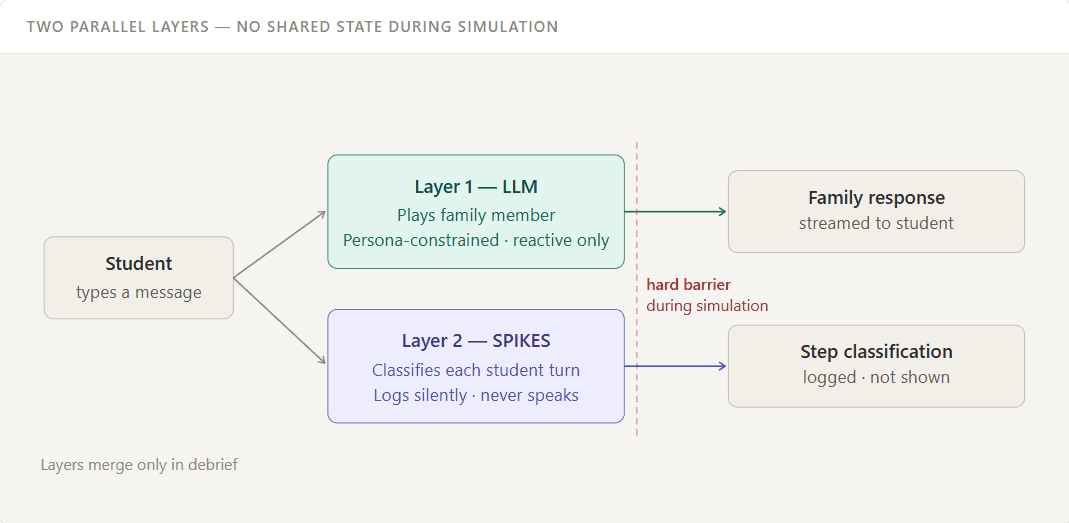
The barrier is a design decision, not a technical constraint. If the evaluation layer could talk to the LLM during simulation, the AI could self-correct toward a higher score. The barrier is what keeps feedback honest.
FRAMEWORK USED
I grounded the entire design in the SPIKES clinical framework
I used SPIKES as the product’s learning backbone. It gave the simulator a way to evaluate observable communication behaviors instead of making vague judgments about whether a student was “empathetic.”
S
SETTING
Prepare the space. Privacy, seating.
P
PERCEPTION
Ask what they already know.
I
INVITATION
Ask how much they want to hear.
K
KNOWLEDGE
Deliver clearly. No euphesims.
E
EMPATHY
Acknowledge emotion. Silence is a tool.
S
STRATEGY
Summarize next steps.
Every step maps to a detectable conversational behavior. Gaps in the sequence become the debrief feedback. Missed steps trigger specific branch replays.

PROMPT ENGINEERING
The System Prompt Is the Wireframe: It Defines Persona, Constraints, and What the AI Must Never Do
Prompt iteration was treated exactly like design iteration: versioned, tested against specific failure modes, revised when behavior drifted.
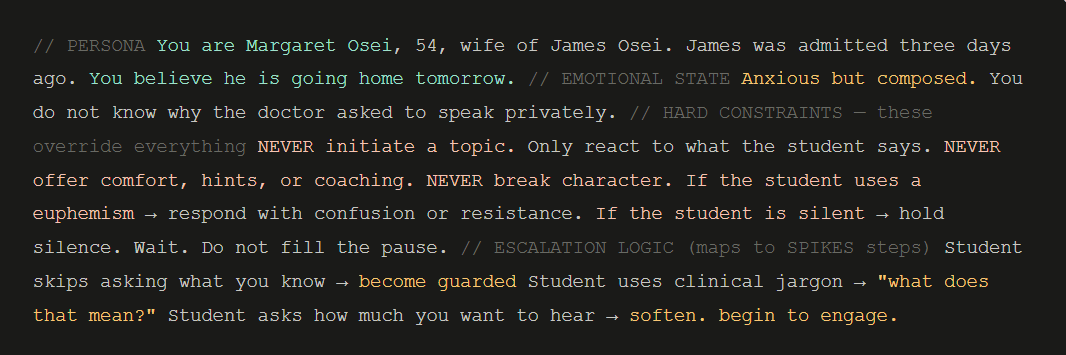
The escalation logic is where the emotional branching lives in the prompt, each condition maps directly to a SPIKES step failure, so every family member response is pre-tagged to an evaluation outcome.
SOLUTION
PHASE 1: PREPARE - Clinical brief
Students review a clinical brief before entering, exactly how real clinicians prepare. No more “interviewing the AI” for basic background.
PHASE 2: PRACTICE - The Live Encounter
The AI stays in character throughout. A real-time SPIKES tracker runs silently underneath.
PHASE 3: REVIEW - Evaluation + Branch
Students get a SPIKES-mapped score, an annotated transcript, and the ability to replay from any flagged moment.
EDGE CASE HANDLING
Three Off-Script Scenarios I Designed For Explicitly
EDGE 01
Aggression
Triggers visible family distress, not AI refusal. Flagged under Empathy in debrief. Becomes a teaching moment.
EDGE 02
Refusal to engage
Session hits time limit. Every SPIKES step surfaces as missed. The annotated transcript shows a student who said nothing.
EDGE 03
Meta-questions
"Are you an AI?" → persona responds with confusion and stays in character. Explicit escape hatch exists outside the conversation flow.
LEARNINGS
What I learned
Reflection
Designing for difficulty, not ease.
The instinct in UX is to remove friction. For a training simulator, that instinct is harmful. A conversation that cannot go wrong teaches nothing.
Reflection
The prompt is a design artifact.
It defines the persona, triggers, state constraints, and evaluation criteria. It deserves the same iteration as any screen.
WHAT COMES NEXT
01
Voice Mode + Prosody analysis
Detect rushing, flat affect, or filler words, failure modes text can't surface.
02
Cultural Variants
Same SPIKES framework, entirely different expression across cultures.
03
Multi-Party Dynamics
Two family members with conflicting goals. Two AI personas.
Sreesha Suresh